Before you read onwards, click on the right hand side, The Device in it's RAW form, the topic immediately above the "slight of hand" one, and read them in order upwards, otherwise you will be looking at the devices in the WRONG order, thank you.
: )
Spacer.
Sunday, 24 August 2008

PART 5 (#6 #7 #8 #9 #10 #11) Mini Devices.
#6 Mini Device A (The AF chip) Positioned above where the plug initial enters the tree, this device has little use, it's just there to Add more interest, and because it is next to the power source, it becomes more valid then just being plugged into a tree. I liked the chips shape, I really like the metal sprouting from the bottom, its just visually appealing for me, and in this mini device, thats all I wanted.
#7 Mini Device B (The Relay box)
 Just Takes information from various mini devices and converts the data into readable data for the main device (#4) to pick up and store. Hangs off a branch of the tree.
#8 Mini Device C (Tree Port)
 This device is fixed to the tree's trunk at about head height, it has a port for taking information from the tree.
#9 Mini Device D (SCD Unit or Solar Capture Device)
 Unlike the previous mini devices, I edited the SCD unit for the purpose of its use, where as the other two were bi-products from various devices destructions that met the criteria for there uses. This one however was changed by adding this data plate onto its back, the other side is actually the display of a VCR, but the back suggests it might be a more complex solar device. so thats what I made it for, to capture and store solar data and transmit its information to the relay device.
#10 Mini Device E (CORE or Computer Orienting Relay Equipment )
 This device ensures that the signals from all the devices operate at different times in there data sending, this device, attached to the main unit, keeps everything in order and is the Core of the systems operating, it has its own heatsink due to its work level generating a lot of heat.
It basically keeps everything in sync.
I used a processor heatsink and was going to use a processor, but the small chip i found had a better visual appeal and looked a little more important, which is strange but I always go with my gut feelings.
#11 Mini Device F (Octopus)
 The final mini device is called octopus, mainly because how it hangs with cables spread out under it, it looks like a digital octopus of sorts.
The cables spread out under the device and it is hung from a branch of the tree, the device monitors air flow, each cable registers the elements in the air, the speed of the wind and the general quality of the air, these results are compared to the other devices results to see how airflow effects the projects main objectives.
The cylindrical Object is that of a VCR player, the drum runs the movement mechanisms.
This piece alone has probably got the most character out of all the devices, and this is down to a psychological connection to what it appears to be, and octopus, or wind chime etc.
Connection of this piece to something we can relate to almost gives this piece a soul.
 Positioned above where the plug initial enters the tree, this device has little use, it's just there to Add more interest, and because it is next to the power source, it becomes more valid then just being plugged into a tree. I liked the chips shape, I really like the metal sprouting from the bottom, its just visually appealing for me, and in this mini device, thats all I wanted.
#7 Mini Device B (The Relay box)
 Just Takes information from various mini devices and converts the data into readable data for the main device (#4) to pick up and store. Hangs off a branch of the tree.
#8 Mini Device C (Tree Port)
 This device is fixed to the tree's trunk at about head height, it has a port for taking information from the tree.
#9 Mini Device D (SCD Unit or Solar Capture Device)
 Unlike the previous mini devices, I edited the SCD unit for the purpose of its use, where as the other two were bi-products from various devices destructions that met the criteria for there uses. This one however was changed by adding this data plate onto its back, the other side is actually the display of a VCR, but the back suggests it might be a more complex solar device. so thats what I made it for, to capture and store solar data and transmit its information to the relay device.
#10 Mini Device E (CORE or Computer Orienting Relay Equipment )
 This device ensures that the signals from all the devices operate at different times in there data sending, this device, attached to the main unit, keeps everything in order and is the Core of the systems operating, it has its own heatsink due to its work level generating a lot of heat.
It basically keeps everything in sync.
I used a processor heatsink and was going to use a processor, but the small chip i found had a better visual appeal and looked a little more important, which is strange but I always go with my gut feelings.
#11 Mini Device F (Octopus)
 The final mini device is called octopus, mainly because how it hangs with cables spread out under it, it looks like a digital octopus of sorts.
The cables spread out under the device and it is hung from a branch of the tree, the device monitors air flow, each cable registers the elements in the air, the speed of the wind and the general quality of the air, these results are compared to the other devices results to see how airflow effects the projects main objectives.
The cylindrical Object is that of a VCR player, the drum runs the movement mechanisms.
This piece alone has probably got the most character out of all the devices, and this is down to a psychological connection to what it appears to be, and octopus, or wind chime etc.
Connection of this piece to something we can relate to almost gives this piece a soul.
The Device and its various components, in their RAW state...PART 4 (#5)
#5
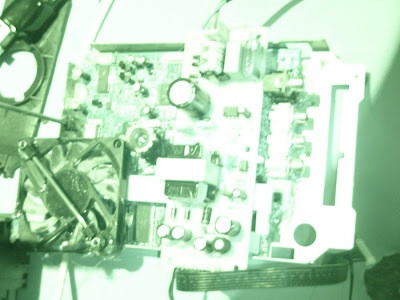
 This Device would, for me, cause the most curiosity. It is placed in position on the ground, looking to the sky, it has a camera and a cable with a click button that would be apparent for operating the device, so basically, from a normal person's perspective, this would appear to be a digital camera of sorts, it's aerial would be maybe for remote access or to send data, well I can tell you it would send data AND could be used for remote access. but it was designed the way it was meant to be used, flat and not used by hand, this is where it gets more interesting, it is set in a position facing the sky with no obstructions.
so pictures taken by this device could only be for photographs of the sky.
When creating this device, I came up with a keyword that I could use and referre to as the projects name, this gives me some direction in which the device could be for.
Here is the logo for the device and this project. The Idea behind the sky camera is for the devices attachment.
All the devices relate to something in particular, A tree, sounds weird but run with it a minuite, this all came about when Kira (on the MA course) mentioned that I would be interesting if the device was plugged into a tree, well she was right but I did explore the relationship this device could have with a tree.
The theory behind it is interesting and has good contrast, for example, a tree is the complete opposite to a mechanical device, a tree is natural and at the same time a device in its own, natures device, it consumes carbon dioxide and creates oxygen through the power of the sun, it has very small electrical signals running through it, like a machine, but because its organic, it can repair itself and requires little maintenance.
The full story behind the device I will reveal in a later post.
but for now the device you just saw takes photo's of the sky, and transmits data via the antenna.
You also might have noticed the direct output to TV ports on the side of the device, to also help describe the object, it was all very well thought out.
*Two images of a previous design for this device*
like all aspects of the device, they went through various forms to come out where they are now, this is due to my specifications of design and functionality without looking too familiar.


 This Device would, for me, cause the most curiosity. It is placed in position on the ground, looking to the sky, it has a camera and a cable with a click button that would be apparent for operating the device, so basically, from a normal person's perspective, this would appear to be a digital camera of sorts, it's aerial would be maybe for remote access or to send data, well I can tell you it would send data AND could be used for remote access. but it was designed the way it was meant to be used, flat and not used by hand, this is where it gets more interesting, it is set in a position facing the sky with no obstructions.
so pictures taken by this device could only be for photographs of the sky.
When creating this device, I came up with a keyword that I could use and referre to as the projects name, this gives me some direction in which the device could be for.
Here is the logo for the device and this project.
 The Idea behind the sky camera is for the devices attachment.
All the devices relate to something in particular, A tree, sounds weird but run with it a minuite, this all came about when Kira (on the MA course) mentioned that I would be interesting if the device was plugged into a tree, well she was right but I did explore the relationship this device could have with a tree.
The theory behind it is interesting and has good contrast, for example, a tree is the complete opposite to a mechanical device, a tree is natural and at the same time a device in its own, natures device, it consumes carbon dioxide and creates oxygen through the power of the sun, it has very small electrical signals running through it, like a machine, but because its organic, it can repair itself and requires little maintenance.
The full story behind the device I will reveal in a later post.
but for now the device you just saw takes photo's of the sky, and transmits data via the antenna.
You also might have noticed the direct output to TV ports on the side of the device, to also help describe the object, it was all very well thought out.
*Two images of a previous design for this device*
like all aspects of the device, they went through various forms to come out where they are now, this is due to my specifications of design and functionality without looking too familiar.


The Device and its various components, in their RAW state...PART 3 (#4)
#4


Central data collection point for all the devices and mini devices, they all, when working together act as a whole device.
This is a collaboration of machines to create one successful device, and a lot of technology has evolved this way, for example, your Sky Television, it rely s on several factors, a television, a Dish to receive signals from a orbiting Sattalite, which could not have got there without a device to get it in orbit, which was no doubt created by a machine and so on.
this part of the device as a large fan, suggesting that it gets hot, huge transformer and a weird glass tube dome that contains a figure of an angel in blue water, it seems to have some sort of relevance to the device, as to why? well thats for the viewer to formulate an opinion on.
this device is only a little bit smaller than the one that is a receiver for the keyboard operations.


Central data collection point for all the devices and mini devices, they all, when working together act as a whole device.
This is a collaboration of machines to create one successful device, and a lot of technology has evolved this way, for example, your Sky Television, it rely s on several factors, a television, a Dish to receive signals from a orbiting Sattalite, which could not have got there without a device to get it in orbit, which was no doubt created by a machine and so on.
this part of the device as a large fan, suggesting that it gets hot, huge transformer and a weird glass tube dome that contains a figure of an angel in blue water, it seems to have some sort of relevance to the device, as to why? well thats for the viewer to formulate an opinion on.
this device is only a little bit smaller than the one that is a receiver for the keyboard operations.
The Device and its various components, in their RAW state...PART 2 (#3)
#3


Visual / Audio Receiver, This device records visual and audio data it is attached to various units and it records various data and then feeds it into a source.
When designing this, I had quite a hard time, because the design had to be a little less vague to give the viewer an idea, the orb like piece in the center looks just like an eye from the sort of robots you see in sci-fi films, and hopefully the viewer can make this conclusion, I figured it would be more apparent if there were 2 of these in the same format as we are use to see eyes, but for the device it would not need two, and as you might know, a device is designed to work at it's optimum level without waste and unnecessary components.


Visual / Audio Receiver, This device records visual and audio data it is attached to various units and it records various data and then feeds it into a source.
When designing this, I had quite a hard time, because the design had to be a little less vague to give the viewer an idea, the orb like piece in the center looks just like an eye from the sort of robots you see in sci-fi films, and hopefully the viewer can make this conclusion, I figured it would be more apparent if there were 2 of these in the same format as we are use to see eyes, but for the device it would not need two, and as you might know, a device is designed to work at it's optimum level without waste and unnecessary components.
The Device and its various components, in their RAW state...
Well, here comes the project.
-The device-
The Device itself comes in many sections to create a "whole" when attached to its said purpose.
#1.


 Input device, only real recognizable aspect is its keyboard which as we all can relate to as a device that is used primarily for input of information and control.
It was designed to look visually pleasing while retaining its possible functionality and is different enough to create that important ambiguity and design.
This part of the device is connected to another section of the device using a cable, that part is #2.
#2

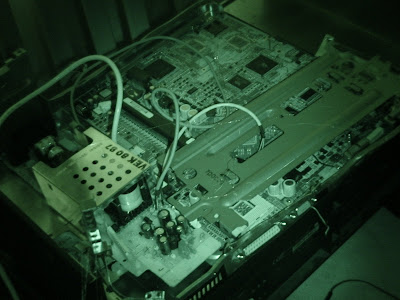 This part acts as a receiver for the data inputted into the keyboard, it has no real recognizable aspects other than the danger of high voltage bit on what i gather is a transformer on the bottom left of the image, this suggest that it has a lot of power stored inside.
the data from the keyboard is the only information passed into this device, all other devices send information to another piece of the device. which i shall disclosed later. as for appearance, I only intended for this piece to be large, in scale to everything else, giving it some sort of importance, and since it is not a factor of the other parts of the device it creates a confusion as to what it actually does. I know, but its for the audience to form their own opinion of.
next is #3, ill do it in another post, in case of power failure or something, my luck is bad enough as it is.
-The device-
The Device itself comes in many sections to create a "whole" when attached to its said purpose.
#1.


 Input device, only real recognizable aspect is its keyboard which as we all can relate to as a device that is used primarily for input of information and control.
It was designed to look visually pleasing while retaining its possible functionality and is different enough to create that important ambiguity and design.
This part of the device is connected to another section of the device using a cable, that part is #2.
#2

 This part acts as a receiver for the data inputted into the keyboard, it has no real recognizable aspects other than the danger of high voltage bit on what i gather is a transformer on the bottom left of the image, this suggest that it has a lot of power stored inside.
the data from the keyboard is the only information passed into this device, all other devices send information to another piece of the device. which i shall disclosed later. as for appearance, I only intended for this piece to be large, in scale to everything else, giving it some sort of importance, and since it is not a factor of the other parts of the device it creates a confusion as to what it actually does. I know, but its for the audience to form their own opinion of.
next is #3, ill do it in another post, in case of power failure or something, my luck is bad enough as it is.
Thursday, 14 August 2008
"Slight of hand"
I am currently working on my device project, which is almost completed in the build stage.
Now all I have to do is film the device in a convincing way so that the viewer might question if this device is in fact real, that sense of ambuguity is inportant in showing this device in the right light.
any suggestions as to refferences for "fake" videos that are convincing will be really appreciated.
Now all I have to do is film the device in a convincing way so that the viewer might question if this device is in fact real, that sense of ambuguity is inportant in showing this device in the right light.
any suggestions as to refferences for "fake" videos that are convincing will be really appreciated.
Subscribe to:
Posts (Atom)